Wednesday, June 24, 2009

Microsoft Security Essentials Beta Released

Microsoft unveiled its new free anti virus software Microsoft Security Essentianls Beta for public formerly named “Morro“.

It seems Microsoft Security Essentianls Beta available for limited number of downloads, but you can still download Microsoft Security Essentianls Beta from alternative downloads from softpedia.


Minimum system requirements for Microsoft Security Essentials Beta
 * Operating System: Windows XP (Service Pack 2 or Service Pack 3);               Windows Vista; Windows 7 (Beta or Release Candidate)

*   For Windows XP
      CPU with clock speed of 500 MHz or higher
      Memory: 256 MB RAM or higher

*   For Windows Vista and Windows 7
      CPU with clock speed of 1.0 GHz or higher
*   Memory: 1 GB RAM or higher
*   VGA (Display): 800 x 600 or higher
*   Storage: 140 MB of available hard-disk space
An Internet connection is required for installation and to download the latest virus and spyware definitions for Microsoft Microsoft Security Essentials.
Internet Browser:
Windows Internet Explorer 6.0 or later
Mozilla Firefox 2.0 or later.

Note : Microsoft Security Essentials requires genuine validation, If you are using pirated Windows operating system you cannot install Microsoft Security Essentianls Beta

Download Microsoft Security Essentianls Beta.

Mirror 1 : Download Microsoft Security Essentianls Beta


Saturday, June 20, 2009

HitWicket – See Live Cricket Score In FireFox Status Bar


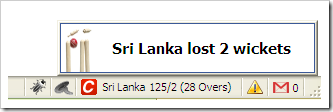
HitWicket is another cool firefox addon which lets you monitor the live cricket scores on any cricket match going on. It is based on ScoreWatch Firefox extension and fetches the updates from CMDN.com in the status bar panel.

It will alert you about any fall of wickets even if you are running a screensaver it will pop up in that case, you can anytime configure the refresh interval of the scores 

 You will not only be able to see the current match score but can also track hat happened in the previous matches

In all this is a great addon to get live scores all the time at work place if you have firefox and internet connectivity.


Install HitWicket

Thursday, June 18, 2009

Check If Someone is Invisible, Offline Or Blocked You On GTalk


There is a great little instant messaging utility, Pidgin that helps to find who has blocked you in Google Talk. If you not sure how to configure Pidgin with Google Talk, I advice you to first visit this page.

Ok, now when you are aware of how to configure Pidgin to work with Google Talk, I’ll guide how to make smart use of Pidgin to identify who has blocked you on Google Talk.

It’s very simple. Just follow the steps:-

* download pidgin


1- Log in to your Gmail account on Pidgin.

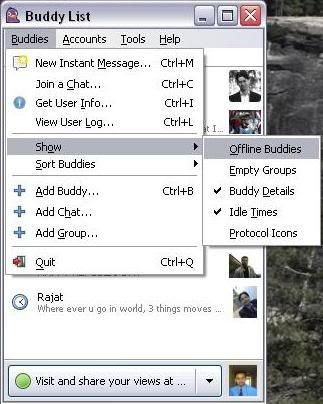
2- Go to “Buddies” -> “Show Offline Buddies“. (A person who has blocked you must be showing offline to you. So you need to make all offline friends visible)

3- Now all your contacts are visible to you. Pick any one of those.

4- Right Click on your chosen contact name and select “Get Info“.
 

It will show you the brief information of your contact. Now, if any of your contact has blocked you on Google Talk, you will not be able to see his/her profile.

6- Select a contact who you think may have blocked you. Again, Right Click on his/her name and select “Get Info“. You will not see anything. Not even the contact’s name.


This goes to show that this particular contact has blocked you on Google Talk and don’t want to talk to you and so it appears to be offline always.

Hope, you like this article. This is the only way I could able to find out to determine who has blocked you on Google Talk. What’s your comment on this?

Wednesday, June 17, 2009

0 UNetbootin – Install Any Version Linux To Your USB Drive or Hard Drive Partition http://www.technixupdate.com/unetbootin-install-any-version-linux

UNetbootin is one such free application which allows you to install various linux / BSD distributions to your hard drive partition or USB drive connected to your computer.

UNetbootin

You can even create a disk image (ISO) simply on your computer and later burn it on the disc. This small TOOL created by UBUNTU which will help you install a wide variety of linux distributions on your portable USB drive.The only requirement to run this application is that you need to have a USB or enough hard drive free space , another thing you will need is the broadband internet connection , download the files required.

Download UNetbootin

DeskLock – Lock Desktop Icons – Prevent The Movement Of Desktop Icons – Fix Desktop Layout

One of the most annoying this I had experienced in windows is when ever I play a game on my desktop or laptop after resuming back from the game. I was used to find my desktop cluttered and all the desktop icons scattered every where.

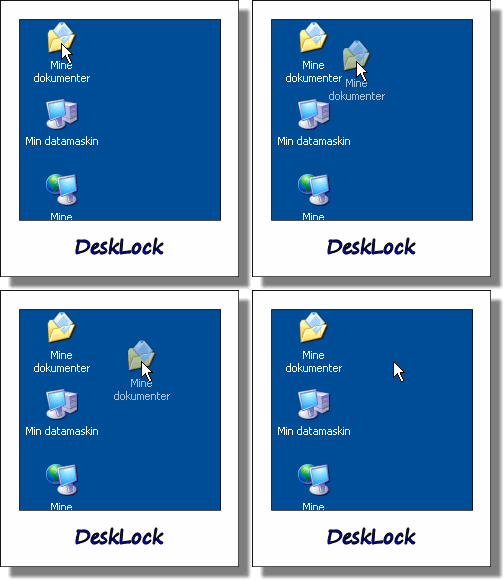
This was really frustrating for me, as I had to rearrange them on the desktop area for easy accessibility. DeskLock is such free software which lets you lock your desktop icons locations so that they can not move from the specified positions you had set.

DeskLock

You just need to make sure that this small utility is running in the system tray and irrespective of what ever you do the desktop icons will not move from their


You can any time disable or enable the DeskLock by double clicking the tray icon in system tray. It is optional to disable left drag and right mouse button for moving the desktop icons

Download DeskLock

Sunday, June 14, 2009

DomainResolver - Find The IP Address Of Any Website Through Its Domain Name

DomainResolver is small free to use tool which lets you find the IP address of any website on web with its domain name. You just need to type in the domain name and press the resolve button at the bottom of the application to get the IP address of the website.

It will also retrieve the domain location easily and even works with sub domain names.

CLICK HERE    

Saturday, June 13, 2009

COMMENT REQUEST

FRNDS..........
PLZ COMMENT IF U LIKE posts or dislike......
plz............
they r most welcome..............

Thursday, June 11, 2009

Password Revealer - Free Portable Password Revealer | Reveal Hidden Password Behind Asterisks

Password Revealer is a small FREE tool (only 65KB) which lets you see most of the password typed in various password box in different password dialog windows of various programs.


In order to reveal any password, you just need bring the password box on the screen, run portable password revealer and click reveal. 

Related Tip: Asterisk Key – See Hidden Passwords Under Hidden Asterisks


This small password revealer does not need any installation so you place it any where or take it anywhere on your USB pen drive or any other portable device.

Please Note: some antivirus programs may mark this program as a "Potentially unwanted program". This is to let you know that if it is left on your computer without you knowing it, that someone with access to your computer may have used it to reveal your passwords. 

Note: Password Revealer is NOT a virus, nor does it contain viruses.

Download Portable Password Revealer


iPhone 3G S Features and Specifications

Apple has officially announced the launch of its fastest and most powerful iPhone called iPhone 3G S.


It is almost same in the shape but it has some new features added including the the camera of the new iphone is upgraded to 3 megapixel with auto focus, Tap to focus, Video recording, VGA up to 30 fps with audio and lot more other features listed below

New Features Added with To iPhone 3G S
* 3MP camera with autofocus, auto exposure, automatic white balance, low light sensitivity,  * macro mode, photo and video geotagging
* 3.5-inch Multi-Touch display with 480 x 320 pixels resolution at 163 ppi
* Records high-quality VGA video at 30 frames per second with video recording built in
* Voice Control enables make call as well as play music with users voice
* Assisted GPS and Digital compass with google Maps for finding location quickly and precisly
* HSDPA, Wi-Fi (802.11b/g) and Bluetooth 2.1 + EDR connectivity
* Intelligent Keyboard delivers fast, better and more precise typing experience
* Cut, copy and paste words and photos, even between applications installed on your iphone
* Added new Voice Memos application
* Improved battery life
* It has Built-in Nike + iPod support
# Will Be Available in white or black color, till July 19 in US

You can see the detailed features of New iPhone 3G S on this technical specifications and feature page

If you have any other questions related to iphone 3g or iphone 3g S, let us know through comments we would love to answer them.
http://www.apple.com/iphone/specs.html

Microsoft Morro

Microsft is getting ready to release Morro which is its free antivirus software for its Windows operating systems. A trial version or public beta will be available soon but no specific date has been released.

Morro may hurt the sales of its comptetitors, McAfee and Symantec antivirus softwares. “It’s a long-term competitive threat,” said Daniel Ives who is an analyst with FBR Capital Markets.

It is designed to prevent viruses, spyware, rootkits, trojans, and other malicious software to run or enter a user’s computer.

“Microsoft’s free product is basically a stripped down version of the OneCare product Microsoft pulled from the shelves,” said Janice Chaffin of Symantec.

Source: Reuters

Wednesday, June 3, 2009

awesome websites of combination of google and bing.....

Microsoft decision engine Bing is the top stories in all tech blogs and media. Every one likes to know whether Bing decision engine is better than Google search engine.

If you want to compare Google search results and Bing search results in a single page with different keywords.

Compare Google Vs Bing

Websites used to compare Bing and Google search engines use frames to split and display Bing and Google search engine.

1. BING N GOOGLE :

Website compares Bing and Google search engine after entering any keyword in their main page.

2. Bingle :

Website compares Bing and Google search engine after entering keyword which issimilar to Bing & Google .

3. Blackdog Google - Bing :

Website is similar to bingle and Bing & Google, where you can compare results in the same page by repeating different keywords.

October 22 - Windows 7 Release

The date of the official release of Windows 7 has been confirmed by a Microsoft spokesperson. “I can finally confirm Windows 7 timing,” said the spokesperson.

A program called Windows Upgrade Option will also be launced for those users who want to upgrade to Windows 7 from Windows Vista.

There will be several editions of Microsoft’s next operating system including Starter Edition, Home Premium, and Enterprise.

The beta version of Windows 7 will end by July 1.

source:

http://www.informationweek.com/news/windows/operatingsystems/showArticle.jhtml?articleID=217701330&subSection=News

Tuesday, June 2, 2009

Download Free Gmail Notifier For Windows 7

Neowin.net has recently released the free gmail notifier application for windows 7, this tiny application will sit in windows 7 system tray and keep running in the background checking for new mails in your gmail inbox you had configured with the application, it will notify you for any new messages in your inbox.


This particular version of gmail notifier is developed to work on windows 7 only, you can right click anytime to see the subject of all the mails together.


Not only this will also notify you when it is unable to check for new mails due to lost internet connectivity, or due to wrong password.


Download Free Gmail Notifier For Windows 7 :

http://www.neowin.net/forum/index.php?showtopic=777838&st=0

Search On Bing From FireFox Search Bar – Add Bing To FireFox Search Box

Microsoft has recently publicly launched their new search engine Bing which is much better and faster as compared to old live search. I had performed couple of searches on bing and found the results very good and quickly, looks like Microsoft had modified the old live search to make it more precise and quick this time.


Bing provides some great general search results now, with high relevance, big index and quick speed. So, lately I have been studying about various other articles of bing tips and tricks and how to add bing to windows 7 and while surfing I came across another cool addon which adds bing to the firefox search bar.

The name of this firefox addon is Bing and its adds bing as a search engine source to the firefox address bar so that you can search any text query on bing from the firefox search bar itself without opening bing.com


This addon will allow you to search any text with search suggestions which makes it more usable and behave just like google tool bar embedded in firefox search bar which provides suggestions when you search.

Install Bing FireFox Addon:
https://addons.mozilla.org/en-US/firefox/addon/12205/

Monday, June 1, 2009

Bing a New Search Engine From Microsoft

guyz congrates...........
a new n great search engine had come..............

Microsoft a multinational computer technology corporation that develops, manufactures, licenses, and supports a wide range of software products for computing devices. But Microsoft can’t beat search engine giant Google.So Microsoft planned to competete with Google and there was a rumor about “Kumo” called as microsoft next search engine which is going to be replaced by Live search.

Bing a New Search Engine From Microsoft

Intially Microsoft products will have a demo’s and rumors before launching and BING is not officially launched.

http://www.youtube.com/watch?v=v_UyVmITiYQ

The above video describes Bing not only a simple search engine like Google a multipurpose search engine for business, shopping, travel and health. The quality of Bing search engine can be measured check it out .it is released officially.

www.bing.com

Thursday, May 28, 2009

How To Run Your Favorite Softwares and Songs Directly From Run

Today i am going to share a cool windows trick with all the readers of Technix Update about how can you run your favorite programs directly typing it from run prompt.


Let us assume that your favorite program is firefox as it is in my case we want to run firefox directly from run prompt and when i type “fire” in run prompt firefox get started automatically.. 

So how are you going to do it.You need to follow some very simple steps…..listed below: -

1.Make a shortcut of your favorite applications or songs which you want to run. 

2.Now Rename these shortcuts with small names so that they become easy to remember like “fire” for the firefox.(Optional Step)
3.Now copy these shortcuts in the folder called system32(which contains some .exe and large no of other files to provide support for various commands like msconfig,cmd etc.) in your operating system drive which is by default is “c drive”. 

Note: so the path to the folder would be if it is a “c drive” :- c:\windows\system32 or You can directly open this folder by typing “system32″ without double quotes in run prompt else replace the drive letter in the above path.


4.Now close all windows and open run prompt by pressing window+r or by selecting it from all programs and type the respective shortcut name for your program n see the magic.

If you like this trick please post your valuable comments about it…

Remove or hide the arrow on the shortcuts in windows vista

There is very simple registry trick behind removing the arrow from the shortcuts in windows vista.

By following the procedure below you will be able to hide or remove the arrow displayed with the shortcuts in windows vista.


Step By Step Procedure :


1. Type “regedit.exe” in the search box without double  quotes.
2. Browse to key HKEY_CLASSES_ROOT
3. Open the Key LNKFILE
4. Rename the value assigned with this key “IsShortcut” something other than.
5. Log out and back in again.
6. You will notice the change.

Revert the procedure to get the arrow again on the shortcuts.If you have any problems in implementing it leave a comment here.

Tuesday, May 26, 2009

Auto Clicker Typer – Record Clicks and Typing and Replay To Automate Any Action On Your Computer

Auto Clicker Typer is a free to use tool which lets you record all the clicks and typing you do on your computer and replay it to do every action you had performed.


This means that just by recording all the clicks and mouse actions you can automate all the actions which you had performed while recording this software.

To start the program you just need to click the Record button on the program interface, in order to repeat what you have done you just need to click the Play button, you can stop any time by clicking the Stop button.

You can define custom hotkeys to play the record script and also set a specific amount of delay in between the consecutive clicks. 

Auto Script Keys 

It also provides a feature called Auto Script Keys. By this you can set hotkeys for upto 10 different saved scripts. This means whatever you are doing if you need your favorite script to run, you simply need to press its hotkey.

Note: This program is free from any kind of adware, spyware and malware etc

Download Auto Clicker Typer:

http://www.asoftwareplus.com/auto-clicker-typer-download.html

Sunday, May 17, 2009

pc magzine or any tech magzine

if u want latest PC magzine or want any tech magzine plz leave a comment here...........

or mail me ankit_coder@rediffmail.com

want to tell about any magzine.......post in comment.

u are most welcome

Friday, May 15, 2009

WINDOWS XP HIDDEN APPS

WINDOWS XP HIDDEN APPS

To run any of these apps go to Start > Run and type the executable name (ie charmap).

WINDOWS XP HIDDEN APPS:
=========================================

1) Character Map = charmap.exe (very useful for finding unusual characters)

2) Disk Cleanup = cleanmgr.exe

3) Clipboard Viewer = clipbrd.exe (views contents of Windows clipboard)

4) Dr Watson = drwtsn32.exe (Troubleshooting tool)

5) DirectX diagnosis = dxdiag.exe (Diagnose & test DirectX, video & sound cards)

6) Private character editor = eudcedit.exe (allows creation or modification of characters)

7) IExpress Wizard = iexpress.exe (Create self-extracting / self-installing package)

8) Microsoft Synchronization Manager = mobsync.exe (appears to allow synchronization of files on the network for when working offline. Apparently undocumented).

9) Windows Media Player 5.1 = mplay32.exe (Retro version of Media Player, very basic).

10) ODBC Data Source Administrator = odbcad32.exe (something to do with databases)

11) Object Packager = packager.exe (to do with packaging objects for insertion in files, appears to have comprehensive help files).

12) System Monitor = perfmon.exe (very useful, highly configurable tool, tells you everything you ever wanted to know about any aspect of PC performance, for uber-geeks only )

13) Program Manager = progman.exe (Legacy Windows 3.x desktop shell).

14) Remote Access phone book = rasphone.exe (documentation is virtually non-existant).

15) Registry Editor = regedt32.exe [also regedit.exe] (for hacking the Windows Registry).

16) Network shared folder wizard = shrpubw.exe (creates shared folders on network).

17) File siganture verification tool = sigverif.exe

18) Volume Contro = sndvol32.exe (I've included this for those people that lose it from the System Notification area).

19) System Configuration Editor = sysedit.exe (modify System.ini & Win.ini just like in Win98! ).

20) Syskey = syskey.exe (Secures XP Account database - use with care, it's virtually undocumented but it appears to encrypt all passwords, I'm not sure of the full implications).

21) Microsoft Telnet Client = telnet.exe

22) Driver Verifier Manager = verifier.exe (seems to be a utility for monitoring the actions of drivers, might be useful for people having driver problems. Undocumented).

23) Windows for Workgroups Chat = winchat.exe (appears to be an old NT utility to allow chat sessions over a LAN, help files available).

24) System configuration = msconfig.exe (can use to control starup programs)

25) gpedit.msc used to manage group policies, and permissions